Custom CRM Solutions
A CRM built for your business. Not the other way around.
Stop adapting your process to HubSpot's fields or Salesforce's workflows. Get a CRM built around your exact sales process, client relationships, and team structure — no per-seat pricing, no record limits.
The CRM problem nobody talks about.
You bought HubSpot (or Salesforce, or Zoho) because you needed to manage clients. Now you spend more time managing the CRM than managing clients.
Your team doesn't use it because it's too complicated. They default to spreadsheets and texts.
You're paying $50-150 per seat per month — and it gets more expensive every time you hire.
You need 3 integrations just to get data from your CRM to your invoicing system.
The "customization" is really just picking from their pre-built options. Your workflow still doesn't fit.
You're at 80% of your record limit and they want you to upgrade to the enterprise tier.
The pipeline stages, deal fields, and contact categories were designed for generic SaaS sales — not YOUR business.
What a custom CRM actually looks like
Your data. Your workflows. Your rules. Built for exactly how your team sells and manages clients.
Your Pipeline, Your Stages
Not "Lead → Qualified → Proposal → Closed." YOUR stages, with YOUR fields, tracking what actually matters to YOUR business.
Automated Follow-Up
Lead comes in → system sends acknowledgment → assigns to the right person → schedules follow-up. No manual steps.
Client Lifecycle Tracking
From first contact to active client to renewal. See every touchpoint, job, invoice, and communication in one place.
Team Dashboards
Sales rep view. Manager view. Owner view. Everyone sees what they need and nothing they don't.
Integrations That Work
QuickBooks, Stripe, Calendly, email — connected natively, not duct-taped through Zapier.
Mobile-First for Field Teams
Techs and reps update the CRM from their phone with big buttons and simple flows. Because "not a computer person" shouldn't mean "can't use the system."
See it in action.
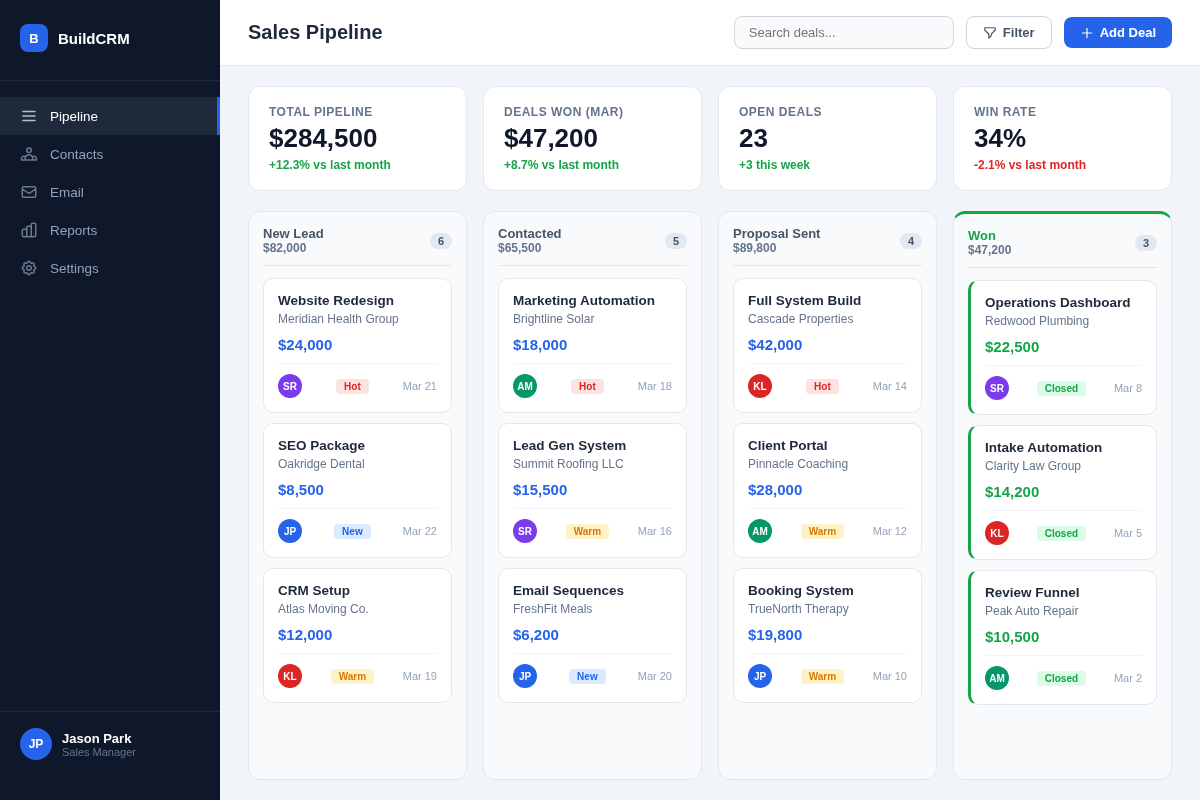
Your pipeline, your fields, your stages — the way you actually sell and manage clients.
CRM Dashboard
Custom CRM vs. off-the-shelf
| HubSpot / Salesforce | Build My System CRM | |
|---|---|---|
| Monthly cost (10 users) | $500-1,500/mo | $125/mo+ flat |
| User limits | Per-seat pricing | Unlimited users |
| Record limits | Varies by tier | None |
| Pipeline customization | Choose from their options | Built for your exact process |
| Integrations | Marketplace / Zapier | Native, built-in |
| Support | Help center, chatbot | Real humans — email + phone |
| Training time | Weeks to months | Minutes — built for how you already work |
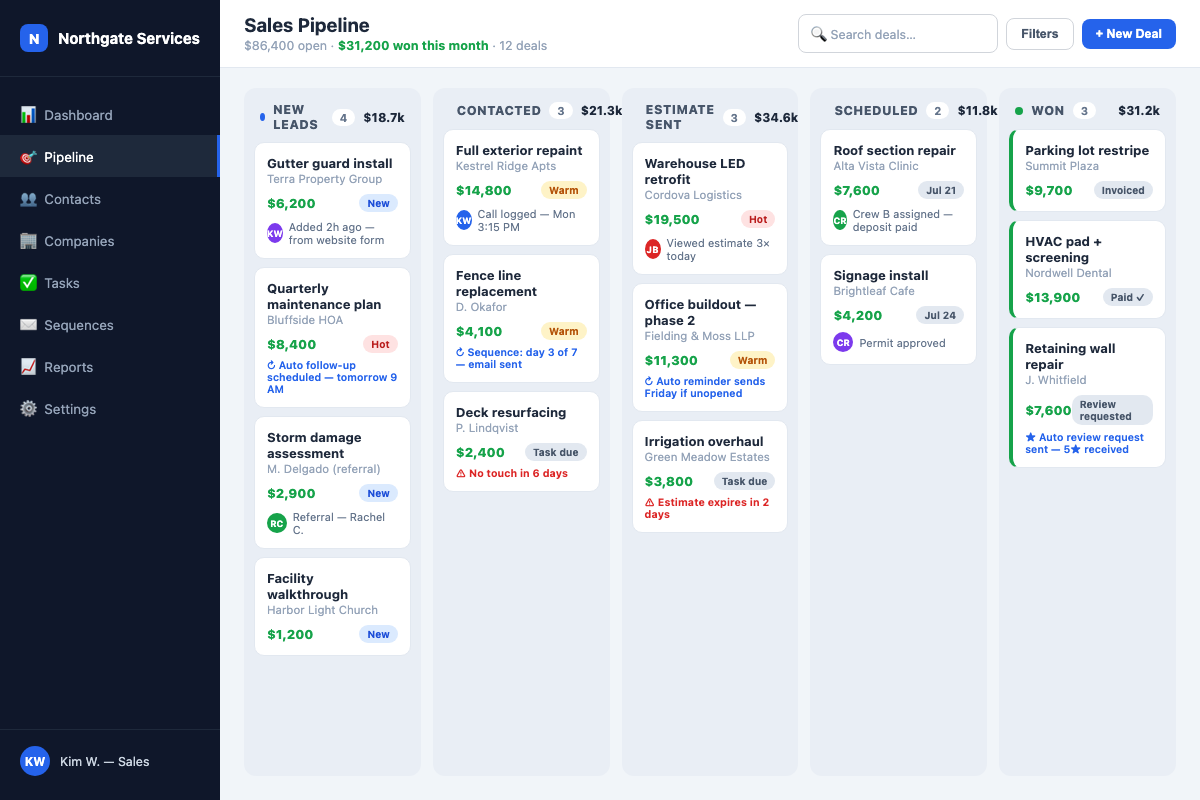
Your pipeline, working for you.
Deals move themselves — auto follow-ups, estimate reminders, stale-deal alerts, and review requests fire without anyone remembering to.
Sales Pipeline
CRMs we've built
Home Services
Lead-to-Invoice Pipeline
Lead capture → estimate → approval → scheduling → job tracking → invoicing → review request. All in one system, zero manual handoffs.
Logistics
Supplier & Buyer Matching
Two-sided CRM connecting suppliers with buyers. Automated matching, communication tracking, and deal pipeline management.
Professional Services
Client Lifecycle Management
Intake → onboarding → active engagement → renewal tracking. Client portal included. Automated status updates and billing.
How do you build a custom CRM?
You start from the pipeline the business already runs, not from a data model. Most of the work is deciding what to leave out — a custom CRM is smaller than an off-the-shelf one, and that is the point.
Map the pipeline that exists
Every stage a customer actually passes through, including the informal one nobody wrote down. If a stage only exists because the old software required it, it does not survive this step.
Find the fields people really use
In most businesses a handful of fields drive every decision and the rest are archaeology. We build for the handful and let the rest go.
Design around the handoffs
CRMs break at the seams between people — sales to ops, ops to invoicing. Those transitions get built deliberately instead of being left to a status field and good intentions.
Ship narrow, then widen
A working system in about three weeks, then refinement as real use surfaces the details no planning session predicts.
A CRM is usually one part of a larger system. Many builds also fold in AI integration for triage and drafting, and replace a stack like Airtable + Softr + Zapier or a field-service app such as Jobber or Housecall Pro at the same time.
Custom CRM questions
How do you build a custom CRM?
How much does custom CRM development cost?
How long does it take to build a custom CRM?
Is a custom CRM better than Salesforce or HubSpot?
Who owns the custom CRM once it is built?
Can a custom CRM connect to the tools we already use?
Not sure the answer is software?
Sometimes the constraint is how the business runs, not what it runs on. That is a different conversation, and it happens under Build with Jeremy — operations consulting for service businesses, same founder.
Talk about operations insteadYour business isn't generic. Your CRM shouldn't be either.
Book a free discovery call. We'll map out what your custom CRM looks like — in 30 minutes.
Book My Free Discovery Call30 minutes. No obligation. No spam.